
oldservers@srv:~$ cat /usr/share/docs/how-to-play.md
// HOW TO PLAY · play on OldServers
We keep 51 retro game servers running 24/7. Getting in takes 4 steps, it's free, and it's built with Argentina and the region in mind.
> jump in, grab the launcher, pick a game, play. that's it.
// 4 STEPS TO PLAY
-
> step 01: ./join-discord
Join the Discord
It's the entry point to the community and the launcher. Inside you'll find the download link, per-game help, and the rest of the players.
-
> step 02: ./get-launcher
Download the launcher
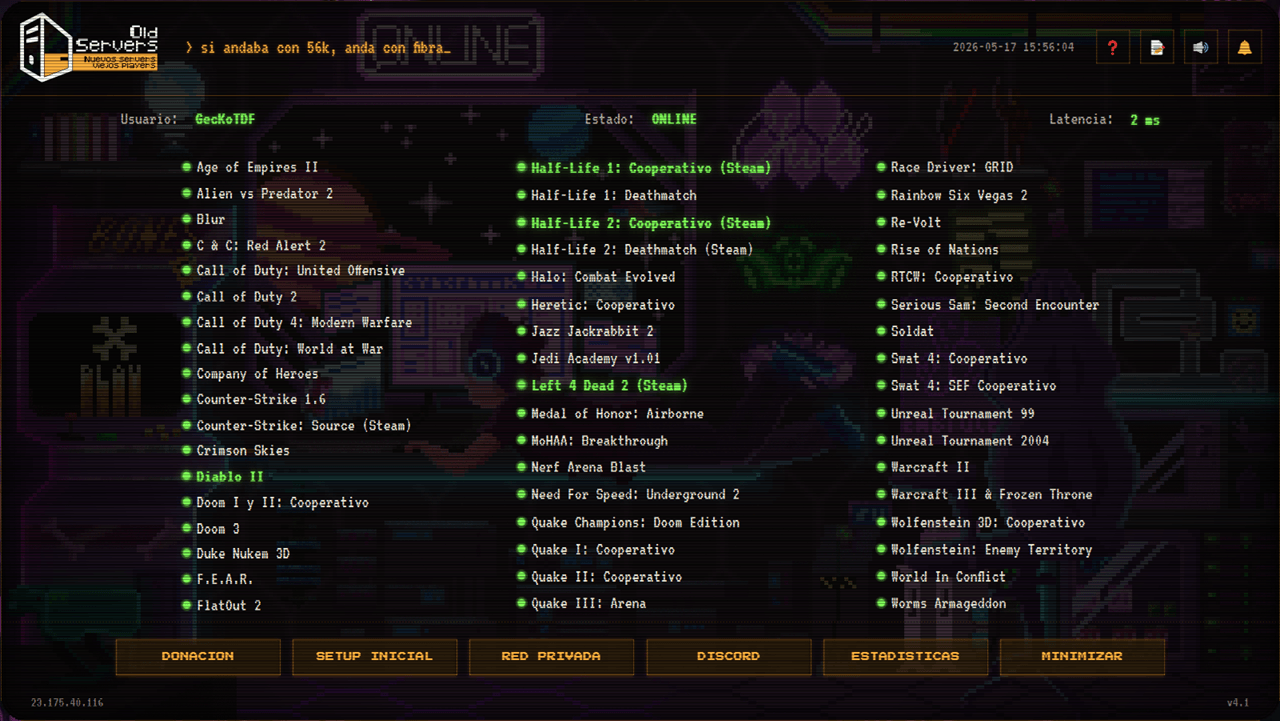
A single launcher for all 51 servers — dedicated and private network. No copying IPs or configuring anything by hand.
-
> step 03: ./pick-game
Pick your game
The launcher lists every server with real-time status. Click the one you want and you're connected.
-
> step 04: ./play
Play
You're in. The rest is nostalgia.
// FAQ · frequently asked
- Is it free?
- Yes — 100% free. The project runs entirely on community donations. No ads, no paywalls, nothing shady.
- Do I need the original game?
- Depends on the game. Some come fully bundled in the launcher; others you need to own on Steam (like Half-Life 2, CS: Source, etc). The launcher itself tells you what each one needs.
- Does it work well from Argentina and Latam?
- Yes. The servers are hosted with low latency for Argentina and the region in mind. That's why the slogan is "here the lag is nostalgia, not a bug".
- Mac or Linux?
- Windows only for now.
- What does the launcher do?
- It's the app that centralizes all 51 servers. Shows which are online, who's playing, lets you check stats, connects you when you open the game, and keeps the server list updated — you don't have to worry about anything.
> ready_player_one:
▸ JOIN THE DISCORD